
PulseMark
A VS Code extension that turns proofreading into an audio-first workflow — listen to your Markdown read aloud with synchronized word highlighting, either through ElevenLabs or a fully self-hosted Ollama + Orpheus stack running on your homelab.
Visit Project#The Problem
Proofreading your own writing is hard. The brain auto-corrects what it expects to see, and awkward phrasing slips past silently. Reading aloud is the classic fix — but for writers, technical authors, and documentation teams working in VS Code, the existing options force a context switch: paste the text into a browser TTS tab, lose your scroll position, lose your place in the document, drift away from the editor.
PulseMark removes that round trip. The review loop stays inside the editor where the writing already happens.
#What It Does
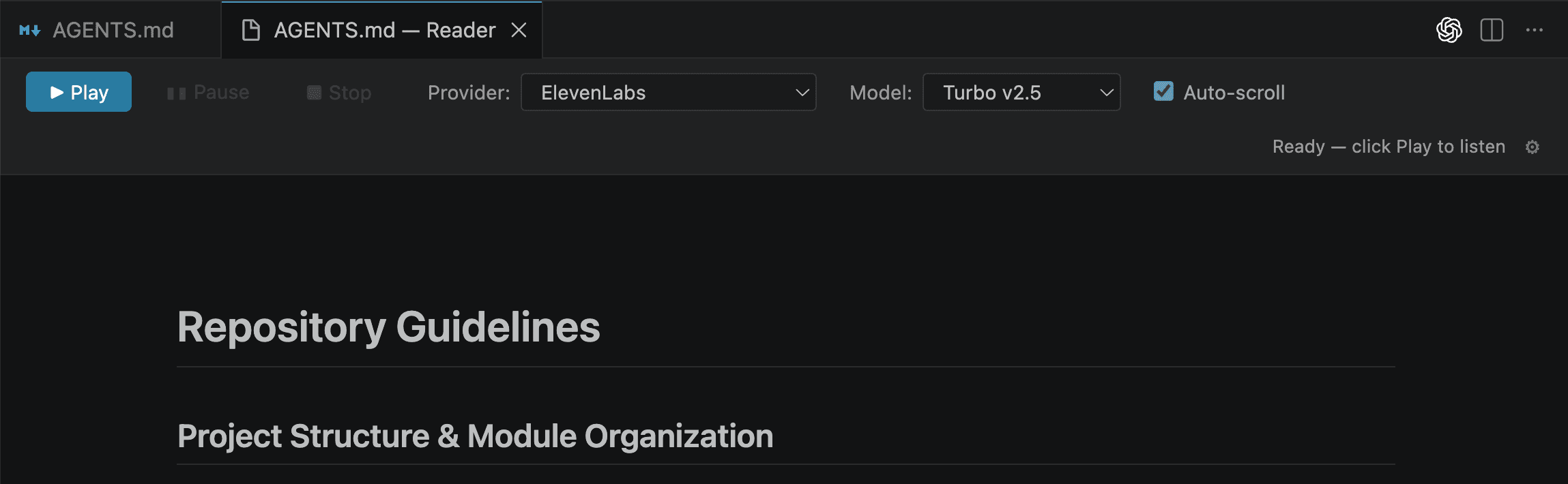
PulseMark opens a dedicated side-by-side preview for any .md file and reads it aloud through a configurable TTS provider. While playback runs, the preview highlights the currently spoken word and auto-scrolls to keep narration in view — so you can listen, follow along, and catch issues without breaking concentration.
- Word-level synchronized highlighting when the provider returns timing data
- Side-by-side preview that updates live as you edit
- Find widget, pause/resume, keyboard shortcuts — everything stays inside VS Code
- Configuration through the native settings surface, not a custom UI
#For Whom
- Technical writers and documentation teams who do repeated review passes on long-form Markdown
- Developers who maintain READMEs, RFCs, and changelogs and want a faster proofreading loop
- Accessibility-conscious teams that need TTS as part of the everyday workflow rather than as a bolted-on feature
- Privacy-sensitive environments where sending drafts to a third-party API is not acceptable
#Homelab & Local Model Hosting
PulseMark was designed from the start to support fully self-hosted TTS, not just cloud APIs. That means anyone running a homelab — or any team that needs to keep drafts inside their own infrastructure — can wire it up to a local OpenAI-compatible speech server and never send a byte to a vendor.
The repo ships with a ready-to-run scaffold for the most common setup:
- Ollama on the host running
legraphista/Orpheusfor neural TTS - Orpheus-FastAPI in Docker exposing
http://127.0.0.1:8000/v1/audio/speechto the extension - A single
docker compose up --buildto bring the stack online
Once the local service is running, PulseMark talks to it the same way it talks to ElevenLabs — same playback, same controls, same workflow. Swap providers from the toolbar without restarting anything. Use ElevenLabs for the highest-quality narration when latency and cost are fine; switch to your homelab when you need privacy, offline operation, or unlimited generation.
#Technical Decisions
The extension is built on VS Code's Webview API, with audio playback running through the Web Audio API inside the webview rather than native Node bindings. That avoids the cross-platform install pain that kills most audio-touching extensions and keeps the surface area small enough to maintain solo.
Audio is generated in chunks and cached on disk (~/.globalStorage/tts-cache/), so re-reading the same paragraph is instant and free. API keys are stored in VS Code's SecretStorage — never in settings.json — and the release pipeline enforces that with a preflight check before every publish.
A clear provider abstraction in tts.ts means a third backend (a different self-hosted server, a different cloud vendor) is a small, isolated change rather than a refactor.
#Distribution
PulseMark is published on the Visual Studio Marketplace. Packaging runs through vsce and a GitHub Actions release pipeline that auto-bumps the patch version, tags the release, and publishes the .vsix — keeping the cadence frictionless enough to ship small improvements without ceremony.
#Outcomes
- A faster, more focused review loop for Markdown inside the editor
- Real choice between cloud quality and homelab privacy, with no workflow difference between the two
- A small, maintainable extension that can grow with new providers and editing features without rewrites